
Emulating bare metal with VBMC + CAPI for Kubernetes provisioning
Fake it till you make it: bare-metal Kubernetes simulation with Cluster API, Metal3 and Virtual BMC.
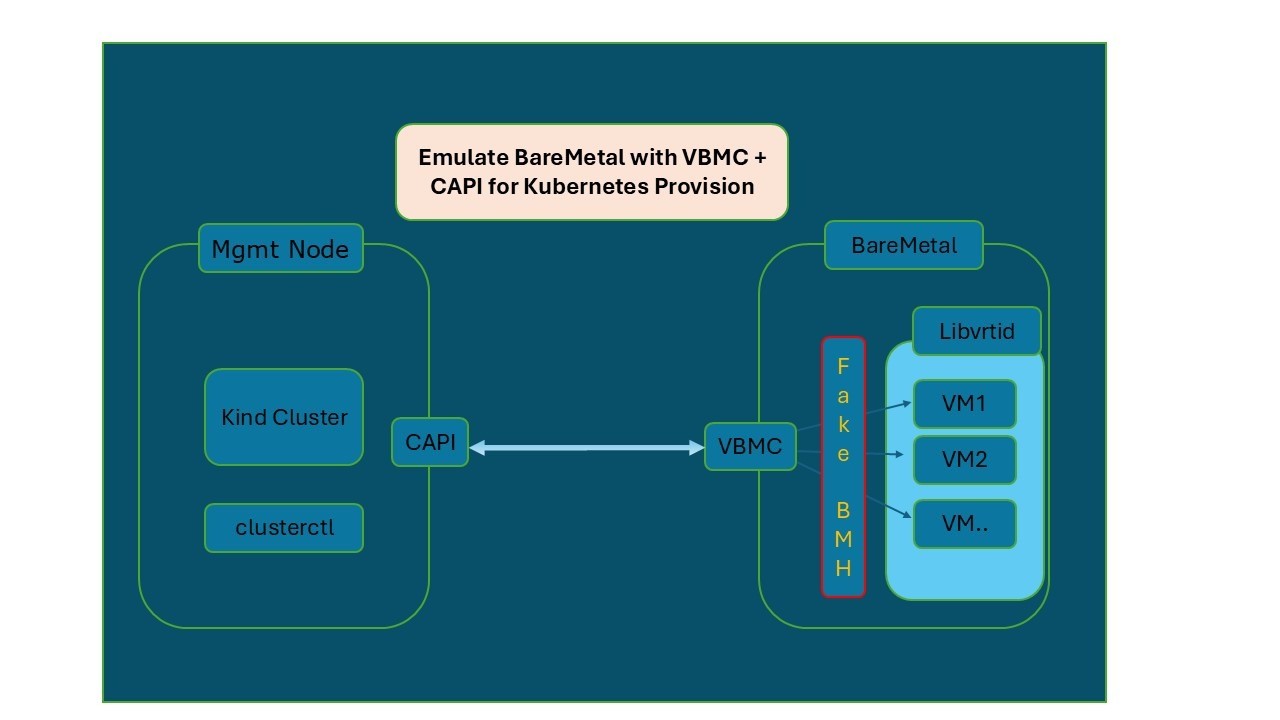
Provisioning Kubernetes on bare-metal servers usually requires expensive hardware, long setup cycles and a lot of patience. But what if you could simulate bare metal on a simple VM and still integrate it with Cluster API (CAPI) + Metal3?
That's exactly what I explored with Virtual BMC (VBMC). It exposes a virtual machine through an IPMI interface, so tools treat it just like a physical server.
Why this matters
- No hardware dependency: perfect for labs, PoCs and maybe CI.
- Realistic workflows: control the VM with
ipmitoolas if it were a bare-metal node. - CAPI integration: test the same automation workflows you'd use in production.
The setup
1. Install dependencies and VBMC
sudo apt-get install qemu-kvm libvirt-daemon-system libvirt-clients virt-manager ovmf ipxe-qemu python3-pip ipmitool
pip install virtualbmc
sudo systemctl enable --now libvirtd
2. Create a VM (our "bare-metal node")
virt-install \
  --name node1 \
  --ram 4096 \
  --vcpus 2 \
  --disk size=100 \
  --os-variant ubuntu22.04 \
  --network bridge=br0,model=virtio,mac=55:54:00:aa:bb:c1 \
  --boot network,hd \
  --noautoconsole
3. Attach VBMC to expose IPMI
Optionally, run the VBMC daemon as a systemd service:
cat <<EOF | sudo tee /etc/systemd/system/vbmcd.service
[Unit]
Description=Virtual BMC Daemon
After=network.target

[Service]
ExecStart=/usr/local/bin/vbmcd --foreground
Restart=always

[Install]
WantedBy=multi-user.target
EOF

sudo systemctl daemon-reload
sudo systemctl enable --now vbmcd
Then add the VM and start its virtual BMC:
vbmc add node1 --address 10.170.10.10 --port 6230 --username admin --password password
vbmc start node1
vbmc list
+-------------+---------+--------------+------+
| Domain name | Status  | Address      | Port |
+-------------+---------+--------------+------+
| node1       | running | 10.170.10.10 | 6230 |
+-------------+---------+--------------+------+
4. Control it with ipmitool
ipmitool -I lanplus -H 10.170.10.10 -p 6230 -U admin -P password power status # or: power on / power off
5. Manage it with CAPI + Metal3
A BareMetalHost definition:
---
apiVersion: v1
kind: Secret
metadata:
  name: vbmc-demo-credentials
type: Opaque
data:
  password: xx   # password, base64-encoded
  username: xx   # user name (admin), base64-encoded
---
apiVersion: metal3.io/v1alpha1
kind: BareMetalHost
metadata:
  name: vbmc-master
spec:
  online: true
  bootMACAddress: 55:54:00:aa:bb:c1
  bmc:
    address: ipmi://10.170.10.10:6230
    credentialsName: vbmc-demo-credentials
  image:
    url: "http://172.22.0.1/images/k8s.qcow2"
    checksum: "http://172.22.0.1/images/k8s.qcow2.md5sum"
Check the status:
kubectl get baremetalhosts
Your VM now behaves like a bare-metal node under CAPI management. 🎉
Key takeaways
- VBMC bridges the gap between VMs and bare-metal provisioning workflows.
- Great for testing Kubernetes cluster automation before moving to production hardware.
- Speeds up learning, prototyping and CI validation without physical servers.
- A VM with nested KVM support should also work as the host.
What's next?
In the next post I deploy a full EKS Anywhere cluster on these simulated bare-metal VMs: Deploying EKS Anywhere on simulated bare metal. Redfish emulation (a modern alternative to IPMI, for example with sushy-emulator) is a natural follow-up.
For a deeper dive into CAPI + Metal3 setup, see the official guide: book.metal3.io/capm3/installation_guide.