
ArgoCD in practice: detecting and fixing configuration drift
GitOps with ArgoCD: the problem it solves, how it works, and a real drift test.
The problem
Once an app is live on Kubernetes, it's common for someone to patch it directly with kubectl — a quick scale, a config tweak, a hotfix under pressure. It works, but now the cluster no longer matches what's in Git. Over time, nobody can say for certain what's actually running versus what's documented. Audits, rollbacks and multi-cluster consistency all get harder from there.
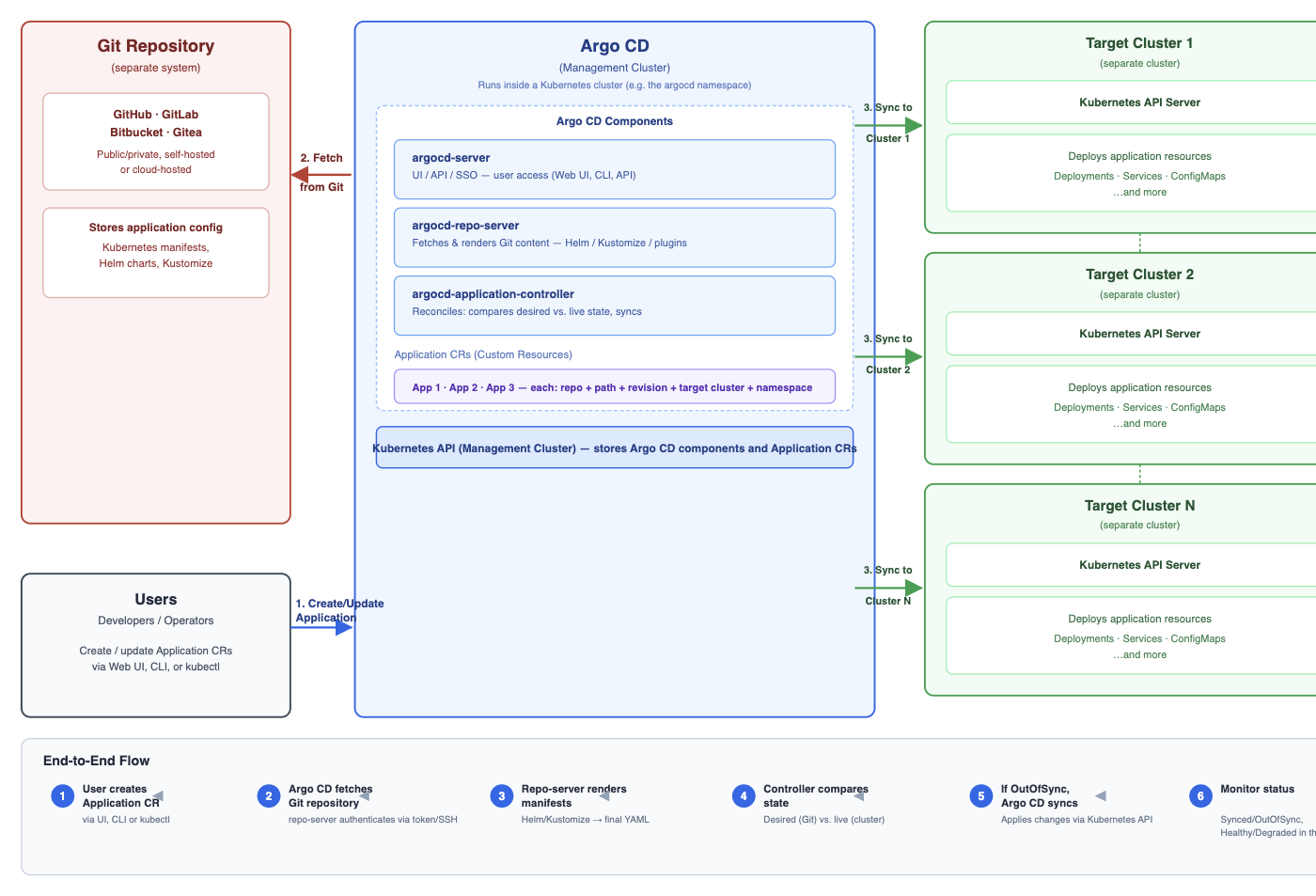
GitOps fixes this by making Git the single source of truth, and ArgoCD is the controller that enforces it — continuously comparing live cluster state against the repo and correcting any difference.
How it works
- Define the app as an ArgoCD
ApplicationCR — repo, path, target cluster and namespace. - ArgoCD's repo-server renders the manifests (plain YAML, Helm or Kustomize).
- Its controller diffs that against the live cluster, on a loop.
apiVersion: argoproj.io/v1alpha1
kind: Application
metadata:
  name: hello-web
  namespace: argocd
spec:
  project: default
  source:
    repoURL: https://git.example.com/labadmin/deploy-demo.git
    targetRevision: main
    path: k8s
  destination:
    server: https://<target-cluster-api>
    namespace: hello-web
  syncPolicy:
    automated:
      prune: true
      selfHeal: true
    syncOptions:
      - CreateNamespace=true
selfHeal: true is the part that matters here: without it, ArgoCD only flags drift (OutOfSync) and waits for someone to sync. With it, drift gets corrected automatically, the moment it's detected.
Testing it for real
I deployed a sample app (hello-web) via the Application CR above, then manually scaled it with kubectl, bypassing Git entirely:
$ kubectl -n hello-web scale deploy hello-web --replicas=6
deployment.apps/hello-web scaled
Reading it back from the cluster's own event log:
$ kubectl -n hello-web get events --sort-by=.lastTimestamp | grep -i scal
...   ScalingReplicaSet   Scaled up replica set hello-web-794fddbd4d to 6 from 2
...   ScalingReplicaSet   Scaled down replica set hello-web-794fddbd4d to 2 from 6
Both events landed in the same second. ArgoCD's controller doesn't wait for someone to open the UI and notice drift — it watches continuously and reverts it before you've finished typing the next command.
Also worth knowing
- Rollback is manual, not automatic.
argocd app rollbackgives you a one-click revert to a previous Git revision — but it needs auto-sync off first, or the next sync just undoes it. True GitOps rollback isgit revert, so Git and the cluster never disagree. - Multi-cluster is the same pattern, repeated. One ArgoCD instance can manage many target clusters from the same control plane — each cluster just gets registered once (
argocd cluster add) and referenced by an Application'sdestination. - Helm and Kustomize both just render manifests. ArgoCD doesn't care which templating tool produced the final YAML — the repo-server renders it, the controller diffs it, the same as plain manifests.
Where to go deeper
I run the full hands-on version of this — two clusters, Gitea, registering a target cluster, the drift/self-heal/prune/rollback sequence step by step — in the Argo CD course on this site, alongside a free, code-first companion lab on GitHub.
Do you run self-heal in production, or only alert on drift?